Best Podcast Hosting Platform for Growing Podcasts
Publishing an episode is only the beginning of building a podcast. The real work starts when you want to turn a growing collection of episodes into a show that people can discover, return to, and support over time. That is where podcast hosting becomes essential. It is the foundation behind a long-term audience and, potentially, a long-term business. As your show grows, the work behind it becomes more connected. Your publishing rhythm, audience reach, brand presence, and future revenue plans begin to depend on the same foundation, so it helps to have a platform that can grow alongside the show rather than requiring you to piece together a new workflow at every stage. This guide explains how hosting supports podcast growth and compares Podbean with five popular alternatives, helping you understand each platform’s strengths, limitations, and ideal use cases. What Changes When Your Podcast Starts Growing? As your podcast grows, the work behind it grows too. Over time, you may find that publishing takes more planning, older episodes are harder to manage, and decisions about reaching new listeners or shaping future content become less straightforward. These are some of the changes creators commonly encounter as a show begins to grow:
- Your episode library grows.
More episodes mean more to store, deliver, organize, and keep up to date. You want an easier way to manage a growing catalog. - Publishing needs to become more regular.
As listeners begin to expect new episodes, the publishing workflow needs to support a more dependable routine. - Listeners find your show through more channels.
As potential listeners use different apps, directories, and social channels, your show needs to be available and accurately presented wherever they encounter it. - Brand ownership matters more.
Relying only on third-party platforms gives you less control over how the podcast is presented. Having a presence you ...

Podbean Now Supports HLS Video in Podcast RSS Feeds
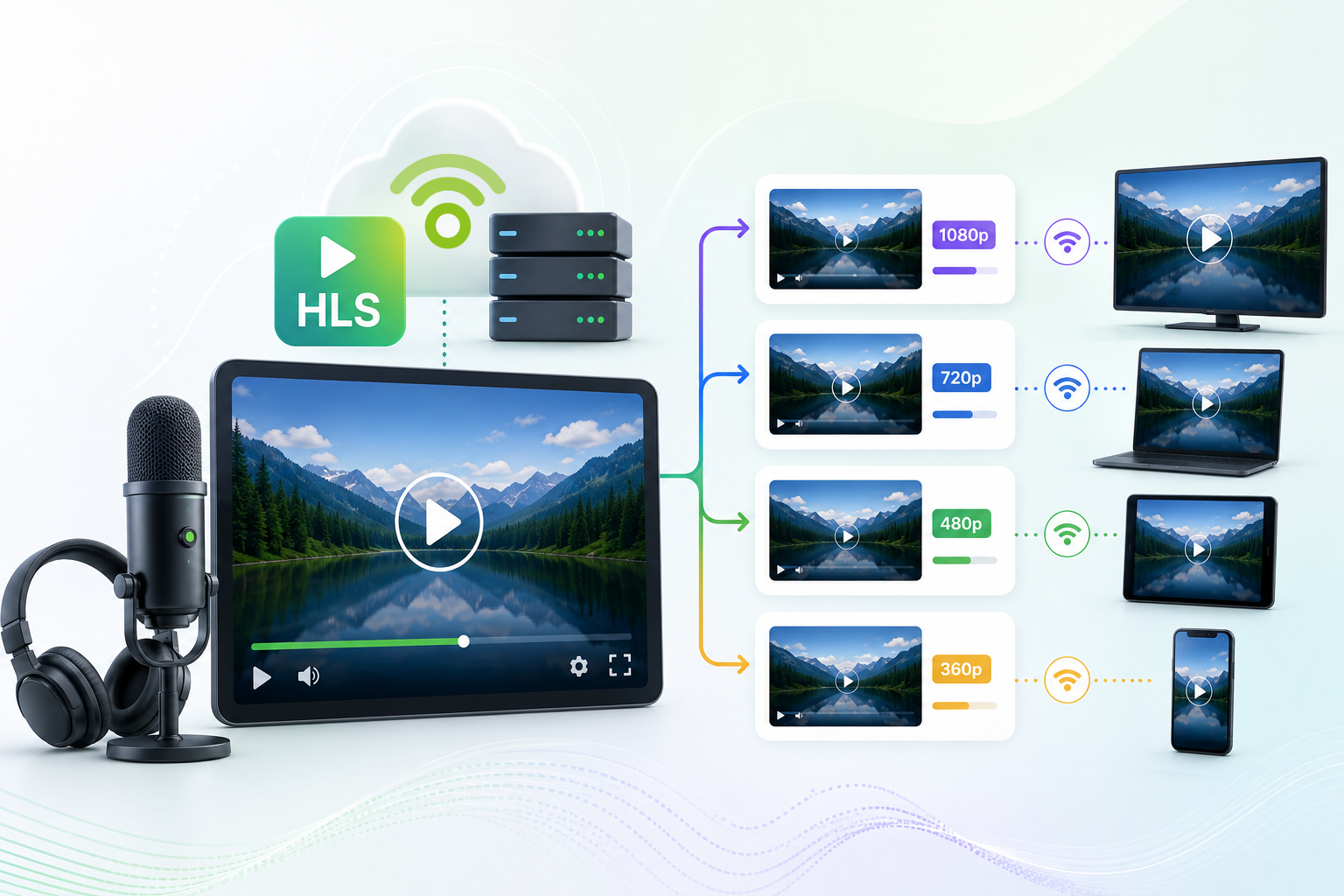
Podbean now supports HLS video information in podcast RSS feeds, allowing compatible podcast apps to provide adaptive video streaming and audio-only playback. Podcast apps that support HLS can automatically select the video bitrate that best matches a listener’s current internet connection. Listeners can also choose Audio-Only Mode when they prefer to listen without watching the video. Podbean already supports HLS video delivery to Apple Podcasts through Apple’s API. By adding HLS video support to podcast RSS feeds, Podbean is making the benefits of adaptive video streaming available to more podcast apps and more listeners. In this post, we will cover: What Is HLS Video? How Does HLS Video Work? What Is Adaptive Bitrate Streaming? Can Listeners Play an HLS Video Podcast in Audio-Only Mode? How Does Podbean Support HLS Video? What Are the Benefits of HLS Video for Podcast Creators? What Are the Benefits of HLS Video for Listeners? Which Podcast Apps Can Play HLS Video from an RSS Feed? Do Creators Need to Upload Multiple Video Versions? How to Enable HLS Video for Your Podcast Frequently Asked Questions What Is HLS Video? HLS stands for HTTP Live Streaming. It is an adaptive streaming technology used to deliver video and audio over the internet. Instead of providing only one version of a video, HLS makes multiple versions available at different quality levels and bitrates. A compatible podcast app can monitor the listener’s network connection and automatically select the most appropriate version during playback. This helps provide smoother video playback across different devices and network conditions. How Does HLS Video Work? When a creator uploads a video episode and enables HLS video, Podbean prepares multiple versions of the episode at different bitrates. During playback, a compatible podcast app can:
- Play a higher-quality video when the listener has a fast ...

Podbean Ads Marketplace vs Dynamic Ad Insertion: Which Podcast Advertising Tool Should You Use?
Podbean Ads Marketplace and Dynamic Ad Insertion both help with podcast advertising, but they solve different problems. Use Podbean Ads Marketplace when you want Podbean to help connect advertisers with podcast inventory. Advertisers use it to run podcast ad campaigns, while podcasters use it to make ad slots available and earn revenue from ads inserted into their shows. Use Dynamic Ad Insertion, also known as PodAds, when you already have ads, sponsors, affiliate campaigns, or VAST ad tags and need a way to control where, when, and how those ads run. Quick Answer: What Is the Difference? Podbean Ads Marketplace helps connect advertisers and podcasters. Dynamic Ad Insertion helps podcasters and networks manage ads they already control. If you want to...Use...Run podcast ads as an advertiserPodbean Ads MarketplaceMonetize your podcast without finding advertisers yourselfPodbean Ads MarketplaceInsert your own sponsor ads, affiliate ads, promos, or VAST adsDynamic Ad Insertion (PodAds)Control campaign dates, locations, placements, and reportingDynamic Ad Insertion (PodAds)Set where ads can appear in episodesAd time slots, used by both tools What Is Podbean Ads Marketplace? Podbean Ads Marketplace is a two-sided podcast advertising marketplace. It connects advertisers who want to reach podcast listeners with podcasters who want to earn money by making ad placements available in their shows. For advertisers, Podbean Ads Marketplace is designed to help create and run ad campaigns on podcasts. Advertisers can target their ideal audience, choose the podcasts they want their ads to run on, and schedule campaigns around their goals. If they already have ad audio, they can upload it; if not, Podbean offers AI-assisted ad creation. Campaign budgets can be as low as $200, making podcast advertising accessible for smaller campaigns as well as larger promotions. For podcasters, Podbean Ads Marketplace is an ad monetization platform that automatically matches your podcast with ...

How to Choose Podcast Hosting in 2026
- Unlimited bandwidth ensures your podcast can grow without surprise overage fees or throttled downloads during traffic spikes.
- Advanced listener analytics help you understand who's tuning in, when they listen, and which episodes resonate most.
- Podbean offers unlimited storage and bandwidth alongside built-in analytics to support your podcast's growth from day one.
- Distribution features should automatically push your episodes to major platforms like Apple Podcasts, Spotify, and Amazon Music.
- Monetization tools like dynamic ad insertion and subscription programs turn your passion project into a sustainable income stream.

Best Podcast Platforms with AI Publishing Tools in 2026
AI tools can help podcasters create better episodes faster, but the best platform depends on which part of publishing slows you down most. Some creators need help turning an idea into a script. Others already have a recording but need cleaner audio, show notes, transcripts, chapters, or social content. Some want AI tools inside their podcast hosting platform, while others prefer a separate editing or repurposing tool. In this guide, we compare five podcast platforms and tools with AI publishing features: Podbean, Buzzsprout, Riverside, Descript, and Alitu. Table of Contents Quick Answer: Which AI Podcast Publishing Tool Should You Choose? What Are AI Publishing Tools for Podcasts? Podbean: Best for AI Podcast Publishing in One Hosting Platform Buzzsprout: Best for Beginner-Friendly Hosting with AI Audio Polish Riverside: Best for Video Podcast Recording, Editing, and Clips Descript: Best for AI Podcast Editing and Post-Production Alitu: Best for Simple Record-Edit-Publish Workflows Comparison Table: Best Podcast Platforms with AI Publishing Tools How to Choose the Right AI Podcast Publishing Tool Frequently Asked Questions Quick Answer: Which AI Podcast Publishing Tool Should You Choose? If you want AI tools connected directly to podcast hosting and publishing, Podbean is a strong choice. Podbean AI helps creators optimize audio, generate episode materials, and create podcast episodes from text, files, URLs, or ideas. If you want beginner-friendly hosting with AI help for audio polishing, episode descriptions, transcripts, and promotional posts, Buzzsprout is worth considering. If you record video interviews or long-form conversations and need AI editing, clips, captions, and promotional assets, Riverside may be a better fit. If you need a dedicated AI editing workspace for transcript-based editing, audio cleanup, captions, clips, and exports, Descript is often used as a post-production tool. If you already have recorded audio and want simpler audio cleanup, transcription, and text-based editing, ...

Solving Podcast Hosting Problems in 2026: A Complete Guide
Getting your podcast recorded is only half the battle. The real challenge begins when you try to get that audio file out into the world where listeners can actually find it. If you've ever hit "publish" and wondered why your episode isn't showing up on Spotify, or why your analytics look suspiciously empty, you're not alone. Podbean helps podcasters tackle these headaches every day through easy hosting, automatic distribution, and built-in analytics. This guide walks you through the most common podcast hosting and distribution problems in 2026 and gives you practical solutions to fix them. You'll learn how to choose the right hosting platform, troubleshoot RSS feed errors, avoid distribution pitfalls, and build a workflow that grows with your show. Let's get your episodes where they belong—in your listeners' ears. Key Takeaways: Podcast Hosting Problems in 2026
- Your podcast hosting platform does more than store files—it generates RSS feeds, manages distribution, and tracks analytics.
- RSS feed errors are the most common cause of distribution failures, but they're usually easy to fix with proper validation tools.
- Choosing a host based solely on price often leads to bandwidth limits, missing features, and migration headaches later.
- Distribution and discoverability aren't the same thing—getting listed is step one, getting found requires metadata optimization.
- Podbean simplifies podcast hosting with unlimited storage, one-click distribution, and built-in monetization tools all in one platform.

How Podbean Automates Apple HLS Distribution
As a podcaster, you already wear a dozen different hats. You’re the host, the producer, the editor, and the marketing team all rolled into one. So, when video podcasting enters the mix, the thought of managing multiple file formats, audio-only tracks, and different video resolutions is enough to make anyone want to hit pause. Well, breathe a sigh of relief. If you’re hosting on Podbean and looking to leverage Apple’s HLS (HTTP Live Streaming) video podcast program, the heavy lifting is already done for you. Here is everything you need to know about how Podbean automates the entire process, saving you time and keeping your audience happy. What on Earth is HLS Video? (And Why it Matters) Podbean simplifies video podcasting by automating support for Apple HLS (HTTP Live Streaming). Uploading a single video file creates multiple high-quality video renditions and an automatic audio-only version for smooth playback on Apple Podcasts. If you aren't a video engineer, HLS stands for HTTP Live Streaming. In plain English, it is an adaptive streaming technology designed to eliminate the dreaded buffering wheel of death. Instead of forcing your viewer to download one massive, unyielding video file, HLS works behind the scenes to make multiple versions of your video available at various bitrates.
- On a strong Wi-Fi connection? Apple Podcasts will automatically serve your viewer the crispest, highest-quality version.
- Stuck on sketchy subway data? The app dynamically switches to a lower-bitrate version to keep the episode playing smoothly without interrupting the flow.

How to Use Nature Sounds for Better Sleep, Focus, and Stress Relief
You close your laptop after a day of back-to-back calls. Your brain is still running. The notification chime pings again. Outside, traffic hums. Inside, your mind won't settle. This is the reality for most people in 2026 — constant noise from devices, open offices, city streets, and digital notifications that rarely stop. Finding a quiet moment is harder than it used to be. That's why more people are turning to nature sounds to reclaim a sense of calm. Research increasingly supports what many listeners already feel: these sounds can help with sleep, focus, and stress relief. If you only need the short version: nature sounds can help lower stress, improve focus, and support better sleep. Studies have found that natural soundscapes are linked to lower stress and improved mood, that nature sounds can boost directed attention performance, and that ambient sound can improve sleep quality and reduce pre-bed anxiety. Start by choosing a sound that matches your goal, listen for 15 to 30 minutes, and adjust based on how you feel. For more control, use an app that lets you mix multiple sounds and adjust each volume independently. Table of Contents Why Nature Sounds Work When Does Nature Sounds Help the Most Where to Find Nature Sounds Podbean’s Ambient Relaxation Frequently Asked Questions Why Nature Sounds Work Research increasingly supports what many listeners already feel. Natural soundscapes have been linked to lower stress levels, improved mood, and better recovery from mental fatigue in multiple studies. It is proven that natural soundscapes — including birdsong — were strongly associated with the lowest levels of anxiety and stress. Short exposure to nature sounds can also boost directed attention performance, according to a study published in Psychonomic Bulletin & Review. And for sleep, a 2026 randomized controlled trial found that ambient soundscapes ...

In 2026, You Should Definitely Submit Your Podcast to These Platforms
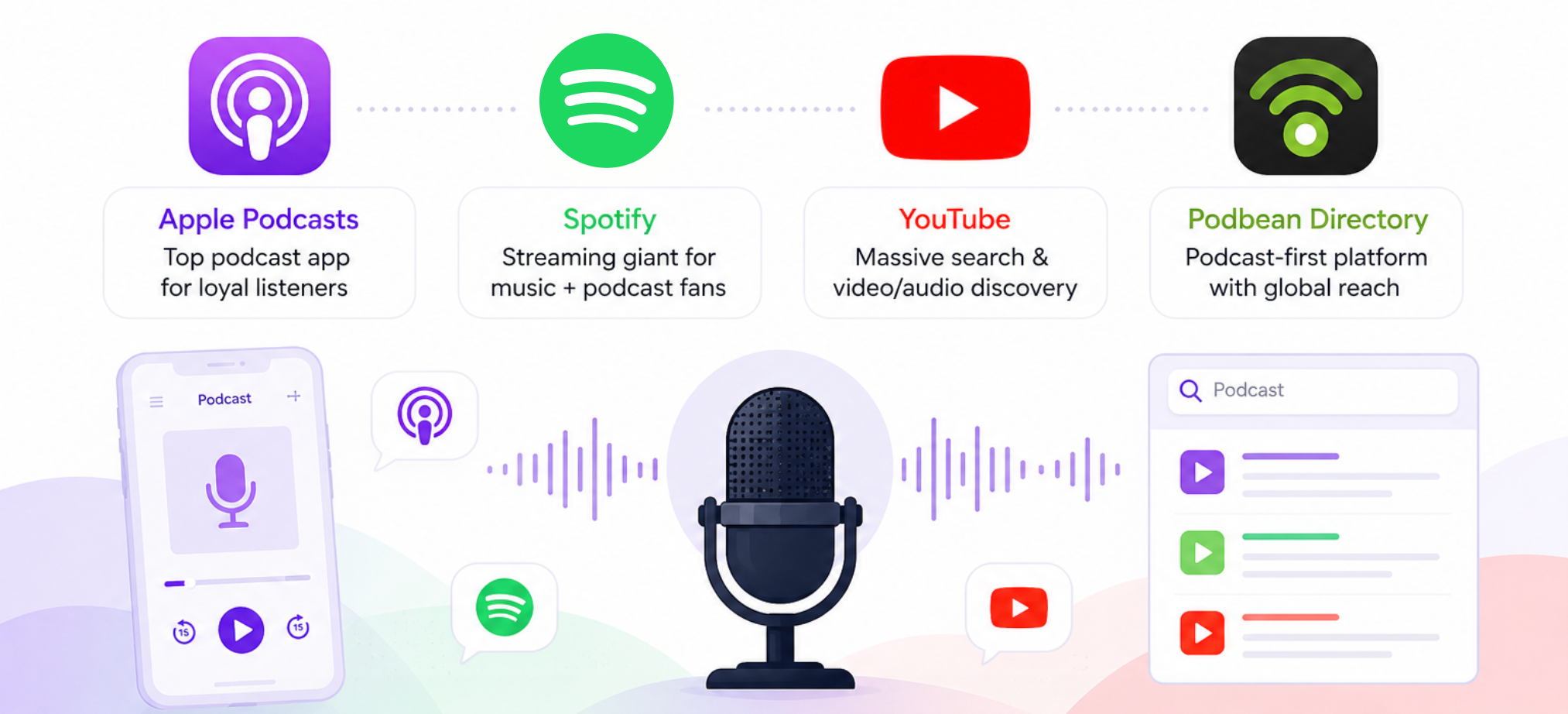
Publishing your first episode is a big step. But if your show only lives on one website, most listeners will never know it exists. To grow your audience in 2026, you need to make your podcast available on the platforms people already use, including Apple Podcasts, Spotify, YouTube, Podbean, and other podcast apps. Table of Contents Quick Answer: Which Podcast Platforms Should You Submit to First? What You Need Before Submitting Your Podcast How Podcast Submission Works With Podbean Why Submit Your Podcast to Apple Podcasts? Why Submit Your Podcast to Spotify? Why Submit Your Podcast to YouTube? How to Submit Your Podcast to the Podbean Directory Other Podcast Platforms Podbean Supports Should You Submit to Every Podcast Directory? Frequently Asked Questions (FAQ) Quick Answer: Which Podcast Platforms Should You Submit to First? If you only need the short version: submit your podcast to Apple Podcasts, Spotify, YouTube, and the Podbean directory first. These platforms cover major listening habits across podcast apps, streaming, search, and video/audio discovery. With Podbean, you can submit to supported podcast apps from your dashboard under Distribution > Podcast Apps. For platforms that require manual submission, you can copy your Podbean RSS feed and submit it through that app's own podcast submission page. What You Need Before Submitting Your Podcast Before you send your podcast to directories, make sure your show information is complete. Most platforms review your RSS feed and use that information to decide whether your show is ready to list. Use this checklist before submitting:
· A clear podcast title
· A short, accurate podcast description
· A podcast category
· A square podcast logo
· At least one published episode
· Your podcaster or owner name
· A RSS feed How Podcast Submission Works With Podbean Podbean creates an RSS feed for your podcast. That feed ...
· A clear podcast title
· A short, accurate podcast description
· A podcast category
· A square podcast logo
· At least one published episode
· Your podcaster or owner name
· A RSS feed How Podcast Submission Works With Podbean Podbean creates an RSS feed for your podcast. That feed ...

How to Use AI in Podcasting Ethically
Artificial Intelligence has officially arrived in the podcasting world. With tools that can instantly polish audio, generate show notes, and draft scripts, the workflow savings are undeniable. Yet, many creators are facing a valid anxiety: If a machine does the heavy lifting, do I lose the authentic connection that made my listeners tune in to begin with? At Podbean, our philosophy is simple: AI should be your assistant, never your replacement. Podcasting is an intimate medium; people subscribe for your unique perspective and human voice—things a robot can't replicate. The goal of AI shouldn't be to hand over the microphone. It should be to offload the tedious administrative chores that cause burnout, freeing you up to focus on the human connection. Here is how to ethically use AI as your ultimate podcasting co-pilot without losing your unique voice. Table of Contents
- Clean the Noise, Keep the Nuance
- The "First Draft" Rule
- Transparent Repurposing
- The Creator’s AI Checklist
- The Ethical Boundary: Use AI to clean the environment, not to alter your humanity.
There is a massive difference between removing a background police siren and artificially altering your vocal pitch, cadence, or tone.
- The Authentic Verdict: Your listeners want to hear you clearly, and a distraction-free listening experience actually enhances authenticity.
Removing an awkward 5-second silence where you dropped your notes ...