What Is a Branded Podcast? Definition, Benefits, and Why Businesses Are Investing
If you’ve ever binge-listened to a show “made by” a company—without feeling like you were being sold to—you’ve experienced the power of a branded podcast. Podcasting is no longer a niche hobby: Edison Research reports that 55% of Americans age 12+ are monthly podcast consumers, and 73% have consumed podcasts in audio or video form (about 210 million people). That scale matters, but attention matters more. Unlike many digital formats built around interruption, podcasts are opt-in: people press play because they want the content. That’s exactly why brands are investing in podcasts they control—shows that build familiarity and trust over time, rather than relying only on short ads. Benchmark research from Signal Hill Insights suggests branded podcasts can generate a measurable “halo effect”: 61% of listeners reported feeling more favorable toward the brand after an episode, 75% said the episode held their attention the entire time, and 63% would recommend it. In this guide, you’ll learn the definition, how branded podcasts differ from traditional advertising, why businesses invest, and what audiences can look for to separate genuinely valuable shows from “content that’s just an ad.” What Is a Branded Podcast? A branded podcast is a podcast series that is owned by—or clearly presented as being produced/brought to you by—a brand (a company, nonprofit, institution, or organization) with the goal of benefiting that brand through valuable content. CoHost’s report uses the practical definition: branded podcasts are “owned or brought to listeners by a company with the purpose to benefit the brand.” The key idea is ownership and intent, not whether the show includes a promotion. A branded podcast usually sits closer to owned media than to an ad placement, even though it’s still marketing. That’s why the best branded podcasts follow a “value first” approach: education, true entertainment, or compelling ...

11 Best Medical and Academic Podcasts to Boost Your Knowledge in 2026
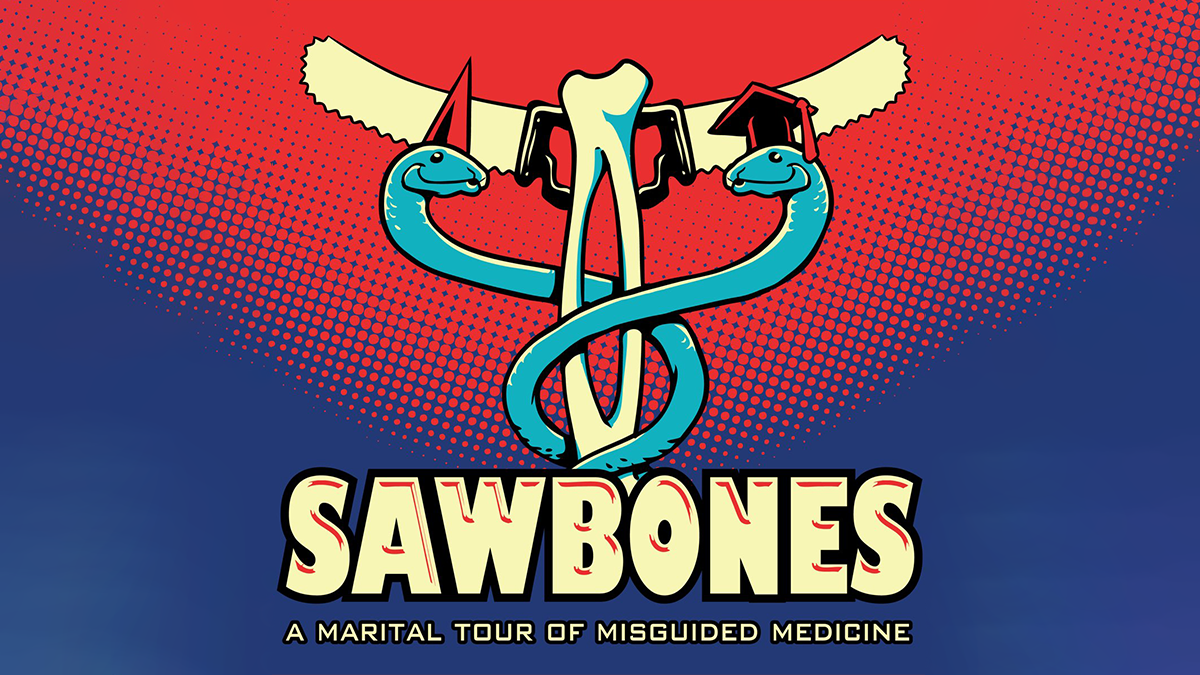
In a world where you can learn about anything from surgical history to ancient philosophy during your commute, educational podcasting’s value is clear. It offers on-demand, well-researched insights on virtually any topic, making learning accessible anytime, anywhere. In this blog post, we’ll highlight some of the best podcasts in two categories – medical podcasts and academic (general educational) podcasts – that are popular with U.S. audiences. Dive in and find your next favorite source of knowledge! Top Medical Podcasts The following podcasts bring medicine and healthcare to life, catering to everyone from healthcare professionals to casual listeners fascinated by medical science. Sawbones Sawbones: A Marital Tour of Misguided Medicine is a hilarious medical history podcast where Dr. Sydnee McElroy and her husband, Justin, chronicle “all the dumb, bad, gross, weird and wrong ways we’ve tried to fix people.” In each episode, the duo dives into the bizarre treatments and questionable cures of the past—from prescribing leeches for nearly every ailment to concocting strange and sometimes dangerous potions. This show is ideal for listeners who enjoy irreverent humor while learning strange and fascinating facts about medical history. If you have a naturally curious mind and a strong stomach for the gross and absurd, Sawbones offers plenty of both. It’s the kind of podcast that makes you laugh out loud one moment and gasp in disbelief the next. This Podcast Will Kill You This Podcast Will Kill You may have an ominous title, but it’s more fascinating than frightening. Hosted by disease ecologists Erin Welsh and Erin Allmann Updyke, the podcast explores the many illnesses, viruses, plagues, and poisons that have shaped human history. In each episode, the two Erins break down a specific disease—covering its historical impact, biological mechanisms, and, ultimately, how concerned listeners actually need to be. This show ...

Introducing Bookmarks: A New Way to Save and Revisit Your Favorite Moments on Podbean
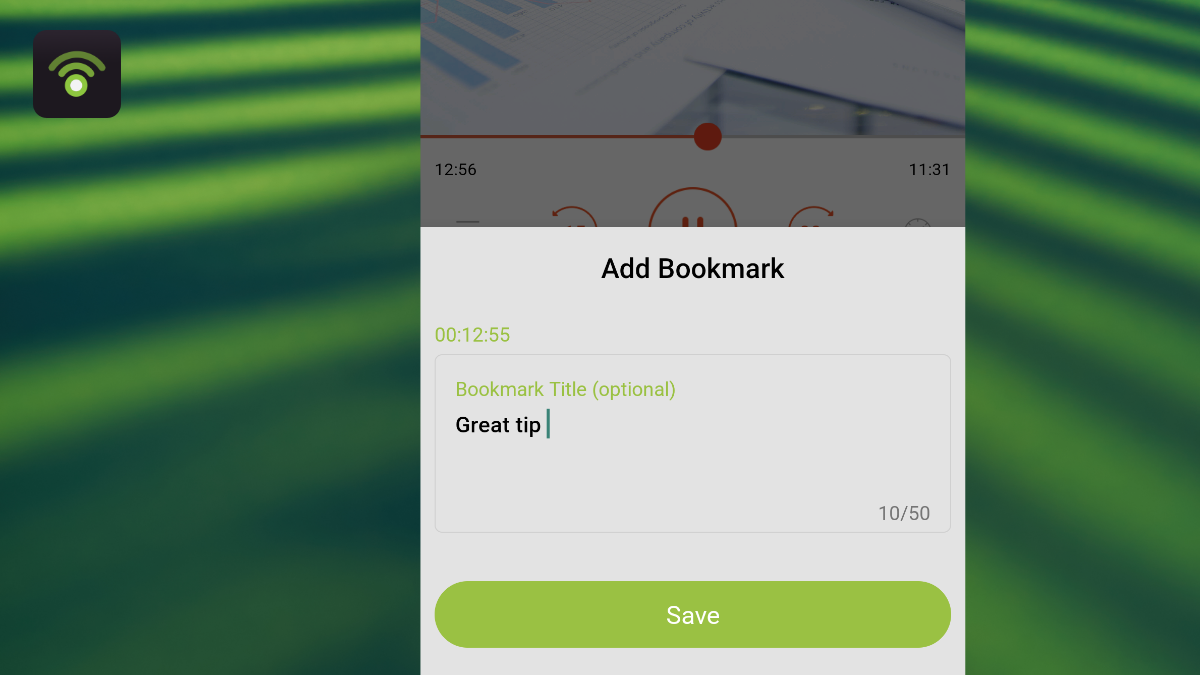
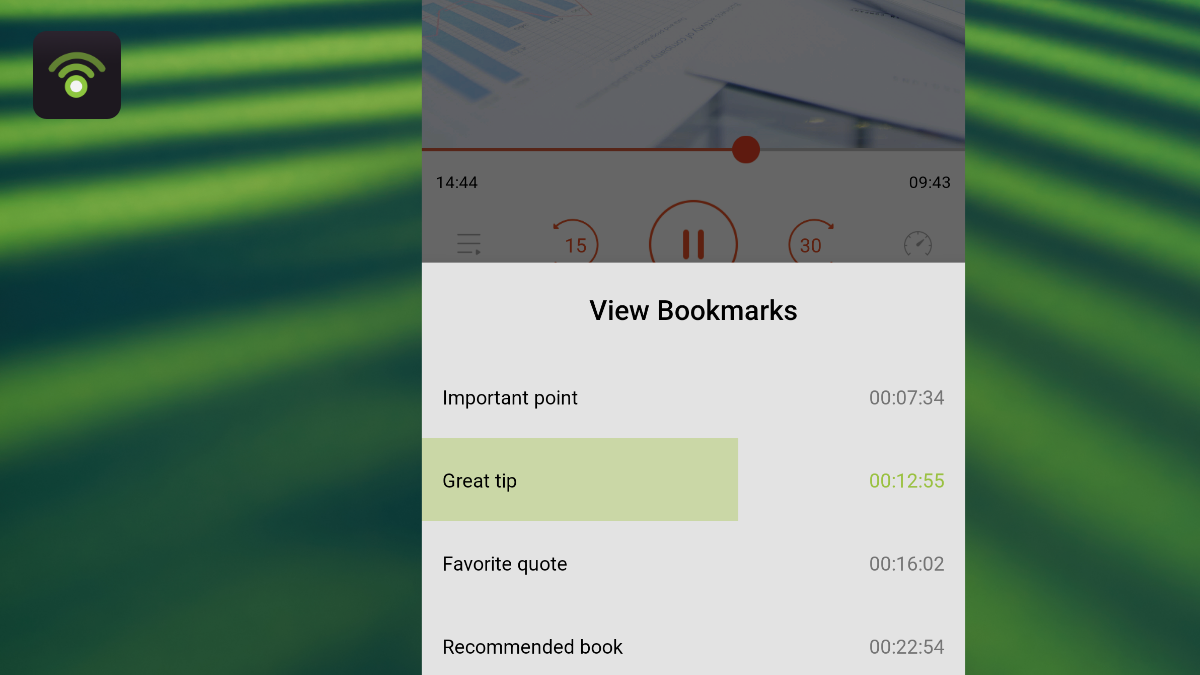
We're excited to unveil a brand-new feature in the Podbean app: Bookmarks! Whether you're a podcast enthusiast or a creator, you’ll love how easy it is to save key moments in your episodes with a timestamp and personalized note. With this new feature, you can quickly revisit those special highlights anytime, creating a more seamless and personalized listening experience. What Are Bookmarks? With Bookmarks, you can mark specific moments in an episode that you want to remember or return to later. Maybe it's an insightful quote, a funny moment, or a useful tip – whatever it is, just tap and save it for future reference. Whether you're revisiting a favorite episode or keeping track of key insights, Bookmarks make it easier than ever to stay organized and keep your favorite content accessible. How to Get Started with Bookmarks 1. Adding a Bookmark
- Open the episode playing page in the Podbean app.
- Tap the Bookmark icon and select Add Bookmark.
- Enter a note to describe the moment you’re saving.
- Tap Save, and you're all set!
- Open the episode playing page in the Podbean app.
- Tap the Bookmark icon and select View Bookmarks.
- Tap any bookmark to jump directly to its timestamp. It’s that easy!
- Save Key Moments: Never lose track of the most important or entertaining moments in your podcasts.
- Personalized Notes: Add your thoughts or insights to any moment for later reflection.
- Quick Access: Jump right ...

Top 10 Financial Podcasts to Listen to in 2026
In 2026, financial podcasts are more popular than ever. Whether you’re a seasoned investor or just starting to budget, the top financial podcasts 2026 offers can help demystify money matters and keep you informed. What’s driving this boom? For one, economic uncertainty and evolving markets have people seeking guidance and clarity. Podcasts offer free, on-demand advice on everything from paying off debt to investing in stocks. And with platforms like the Podbean app making it easy to discover and listen to shows on the go, learning about money fits into anyone’s schedule. Below, we’ve curated a list of the top 10 financial and money podcasts to follow in 2026. These shows span personal finance, investing, and economic news. Each entry includes what the podcast is about, who it’s for, and why it’s a must-listen in 2026. We’ve also included a quick-reference table and some honorable mentions, so you can scan and find the perfect show for your interests. (Below is a quick overview of our featured podcasts. In the sections that follow, we’ll dive into what makes each show worth listening to in 2026.) Top Finance Podcasts 2026 at a Glance PodcastHostFocus/ NicheWhy Listen in 2026The Ramsey ShowDave Ramsey & TeamPersonal finance & budgetingTough-love advice on debt, budgeting, wealth – a perennial favorite for getting finances on track.Planet MoneyNPR (Multiple hosts)Economics explained simplySmart, story-driven insights tying everyday topics to the economy; keeps you informed on world money matters.So MoneyFarnoosh TorabiPersonal finance interviewsAward-winning show with 40+ million downloads; features tips and inspiring money stories from experts and listeners.We Study BillionairesStig Brodersen, Preston Pysh, & teamInvesting strategiesWorld’s largest investing podcast (180+ million downloads); learn tactics from Warren Buffett, Ray Dalio and other billionaire investors.BiggerPockets MoneyMindy Jensen & Scott TrenchFinancial independence (FIRE), real estateStrategies for serious FIRE enthusiasts; practical tips on building wealth ...

Announcing Podbean AI Podcast Creator: The Future of Podcasting is Personalized, Effortless, and Human-Centered
Today marks a pivotal moment in the world of audio. We are thrilled to introduce the Podbean AI Podcast Creator, a groundbreaking tool designed not to replace the magic of human storytelling, but to empower everyone to tell their stories, no matter how niche or specific. For too long, creating a podcast has required significant time, technical skill, and resources. At Podbean, we believe that every voice deserves to be heard, and every community, organization, or personal interest should have its own audio channel. The Podbean AI Podcast Creator is here to make that a reality! Beyond the Hype: Empowering Your Unique Content When we talk about AI, the conversation often steers to replacement. But at Podbean, our vision is firmly rooted in empowerment. The AI Creator isn't about automating away creativity; it's about unlocking it for everyone who previously couldn't access it. Imagine:
- A Parent's Dream: You want to keep up with your child's local school sports team. Newsletters and emails are great, but with AI Creator, you can instantly generate a personalized podcast from those updates, letting you listen on the go—something no mainstream podcast would ever cover.
- The Connected Company: Your business sends out vital internal newsletters to employees, vendors, or customers. With AI Creator, you can now effortlessly create a companion podcast. Transform static text into an engaging audio summary, allowing your team to stay informed during their commute or workout, reducing valuable screen time.
- Your Passion, Amplified: Have a niche blog, a specific hobby, or a local community event that deserves an audio spotlight? Turn any idea, text, file, or URL into a custom podcast episode in minutes.

The Ultimate Guide to Audiobooks: Platforms and Options
Audiobooks have surged in popularity as a convenient way to enjoy books through audio. In this guide, we’ll explore what an audiobook is, where you can find audiobooks (including free audiobook options and top listening platforms), and what to consider when choosing an audiobook service. Whether you’re a podcast listener curious about audiobooks or an avid reader looking for listening platforms, this article will help you navigate the world of audiobooks in a neutral, informative way. What Is an Audiobook? An audiobook is essentially an audio recording of a book being read aloud. Instead of reading text on a page, you listen to the narration – which might be performed by the author, a professional voice actor, or even a celebrity. This format has surged in popularity in recent years, becoming a mainstream way to enjoy literature. In fact, over half of U.S. adults have listened to an audiobook (around 137 million people), and 38% listened to at least one in the past year – up from 35% the year before (Source: Edison Research). Global audiobook sales have also climbed steadily, rising about 9–13% annually in recent years and topping $2 billion in 2023. This growth is fueled by our busy, mobile lifestyles and the convenience of on-demand audio entertainment. Audiobooks are increasingly accessible through many platforms and apps. Big tech and publishing companies have invested heavily in audiobooks, and even library apps now make it simple to borrow digital audiobooks for free. Accessibility is a key driver: 72% of listeners say it’s important that audiobooks are available on their favorite listening platform, and 63% value access via library apps. In 2023 alone, listeners worldwide borrowed 235 million audiobooks from libraries, a 23% jump from the previous year. Clearly, audiobooks aren’t just a trend – they’re becoming an integral part ...

Big 12 Sports Podcasts and Media: Top Shows, Trends, and Platforms
Executive Summary
- Booming Big 12 Podcast Scene: Big 12 sports podcasts are thriving as the conference grows, offering fans in-depth coverage on football, basketball, and more, especially amid recent expansion to 16 teams.
- Top Shows & Fan Favorites: Leading podcasts like Heartland College Sports (with host Pete Mundo) and Ten12 Podcast cover all Big 12 teams, while daily shows such as Locked On Big 12 deliver up-to-date conference news. Fans also flock to independent productions (e.g. 365 Sports on YouTube) and team-specific podcasts for local perspectives.
- Platforms & Hosting: Several independents are hosted on Podbean (for example, Kurt's Korner and The No Defense Podcast both use Podbean URLs), whereas others partner with networks or media outlets. Regardless of host, nearly all are available on major apps like Apple Podcasts and Spotify for easy access.

Anchor vs Podbean: What Changed and Why Podcasters Are Making the Switch
If you’ve followed podcasting over the last few years, you likely remember Anchor – the popular free podcast hosting platform that promised to make podcasting easy for everyone. In 2019, Anchor was acquired by Spotify, and by early 2023 Spotify rebranded Anchor as “Spotify for Podcasters.” The Anchor name was retired at Spotify’s March 2023 Stream On event. On the surface, it might seem like only a branding change. But a lot has changed from the Anchor of “then” to Spotify for Podcasters now. Over time, Spotify has integrated Anchor’s features into its ecosystem – and even removed some beloved Anchor capabilities. These shifts have left many creators wondering: Is the new Spotify for Podcasters the same Anchor I signed up for? And if not, is there a better alternative for the long run? Why Creators Are Rethinking Anchor (Spotify for Podcasters) Anchor’s original appeal was easy to see: free, unlimited hosting with simple creation tools and one-click distribution. It lowered the barrier to entry for podcasting. However, as the platform evolved into Spotify for Podcasters, many creators have started to question if “free” is worth the trade-offs. Here are some reasons podcasters are giving Anchor a second thought: Loss of Key Features Spotify has begun sunsetting features that Anchor users loved. Notably, the ability to record or edit podcasts directly in the Anchor app or web dashboard – once a hallmark of Anchor’s ease-of-use – is being discontinued. The innovative “Music + Talk” feature (which let creators interweave Spotify songs into episodes) was also shut down. These changes suggest a shift in Spotify’s priorities, focusing less on creation tools and more on being a distribution platform. Creators who relied on those convenient tools now must find alternatives or do without. Basic Analytics (Outside Spotify) It’s true that Spotify ...

What Equipment and Setup Do You Need to Start a Podcast for Amazon Podcasts & Music?
Starting a podcast and making it available on Amazon Podcasts & Music is an increasingly popular goal for creators. Amazon Music and Audible now reach millions of listeners worldwide, and podcasts have become a core part of their audio ecosystem. However, many new podcasters misunderstand how Amazon Podcasts & Music works. Amazon does not host podcasts. You cannot upload audio files directly to Amazon Music. To appear on Amazon Podcasts & Music, you must first use a podcast hosting platform that stores your episodes, creates an RSS feed, and distributes your show. This guide explains:
- The exact equipment you need to start a podcast
- How to record, host, and publish your episodes
- How Podbean helps you distribute your podcast to Amazon Podcasts & Music and beyond
- You need a podcast host: Before you can appear on Amazon Music, you must upload your episodes to a hosting ...

Apps for CarPlay and Android Auto: Drive-Time Listening with Podbean
Commuting by car has become one of the best times to catch up on your favorite podcasts. Thanks to modern in-car platforms like Apple CarPlay and Android Auto, you can safely enjoy podcasting apps in your car without ever picking up your phone. In this post, we’ll explore how CarPlay and Android Auto make on-the-road podcast listening easy, compare popular podcasting apps (Spotify, Apple Podcasts, Google Podcasts, etc.), and show why Podbean is a standout choice for podcast lovers on the move. CarPlay & Android Auto: Bringing Podcasts to Your Car Apple CarPlay and Android Auto have transformed in-car entertainment by integrating our phones’ apps with car dashboard displays. If you have an iPhone, CarPlay allows you to connect it to compatible vehicles and access apps through the car’s touchscreen or via Siri voice commands. Similarly, Android users can use Android Auto to get a driver-friendly interface for key apps. Both platforms support navigation, calling, music, and importantly – podcast apps. This means instead of fumbling with your phone, you can use your car’s controls or voice assistant to play, pause, skip, or search for podcasts. CarPlay, for example, works with Siri and your car’s knobs/touchscreen so you can stay focused on the road while listening. Android Auto offers a similar experience with Google Assistant integration, making it easy to listen safely while you drive. In short, CarPlay and Android Auto bring your favorite podcasting apps to your car in a way that’s convenient and safe – perfect for commutes or road trips. Podbean: Your Ultimate Podcasting App on the Road When it comes to podcasting apps for your car, Podbean shines as an all-in-one solution. The Podbean podcast app fully supports both Apple CarPlay and Android Auto, meaning no matter what phone or vehicle you have, Podbean works ...